Time clock · Time cards · Scheduling · Payroll export
Time clock and time & attendance software for hourly teams
Employees clock in from a phone or browser. Time cards calculate regular, overtime and double time under your state's rules. Managers approve the period and payroll gets a file it imports. Built for businesses anywhere in the United States.
14 days free, no credit card, no contract. Free for good on teams of up to 3.
14 days
free trial, no credit card
50 + DC
states of overtime & break rules
6
payroll providers exported to
iPhone
app with passkey sign-in
Watch
See the whole thing in 90 seconds
A real account, from the morning's punches through to the payroll file, and the iPhone app in the employee's pocket.
Everything in one place
Employee time tracking from the first punch to the payroll file
One system for the time clock, the time cards, the schedule, the time off and the export. No modules to buy, no per-seat pricing, and every compliance feature on every paid plan.
Time clock
A web and mobile time clock employees use to punch in and out from any device.
Time cards & approvals
Digital time cards that calculate regular, overtime and double-time hours as punches happen.
Overtime tracking
Track overtime under federal and state rules: weekly after 40, California daily and double time, Alaska, Colorado, Oregon manufacturing and 7th-day premiums.
Shift scheduling
Build the week in minutes, copy it forward, plan unpaid meal breaks into each shift, and see scheduled versus actual hours by department.
Time off & leave
Employees request PTO, sick time and other leave from their phone; managers approve, and the hours land on the time card and the schedule automatically.
Location-based clock-in
Record where every punch happens, flag punches outside your site, or require employees to be on site to clock in.
Payroll export
Export an approved pay period as an import-ready file for Gusto, QuickBooks Payroll, ADP RUN, Paychex, Rippling, OnPay or a generic CSV, with regular, overtime, double time and PTO split out..
Mobile app
Employees clock in and out, check their time card, request time off and see their schedule from the 9forty5 iPhone app, with GPS punch location and passkey sign-in..
Reports & insights
Hours by employee and department, overtime watchlist, scheduled versus actual variance, site comparison, and pay-period summaries.
AI insights
A daily brief and pay-period digests written from your own punch data, and plain-English answers to questions like "who is on track for overtime this week?".
Multi-site & departments
Each location is a site with its own rules, schedule and pay period; each crew a department. One account, one bill.
Role-based access & passkeys
Associates see their own clock and card, managers their site, general managers the company. Sign in with Face ID or Touch ID.
See it
What managers and employees actually see
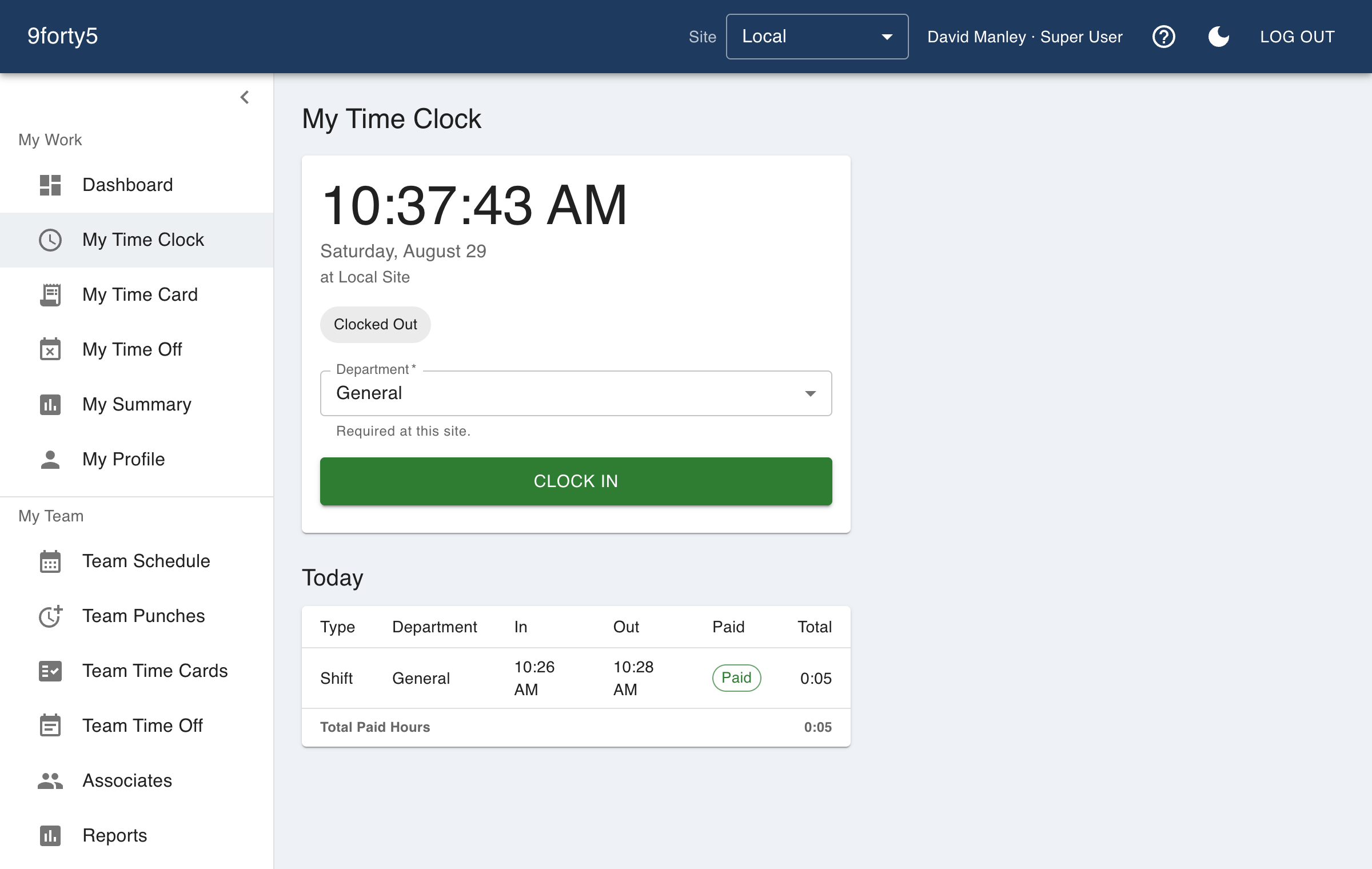
Time cards & approvals
Time cards that already know your overtime rules
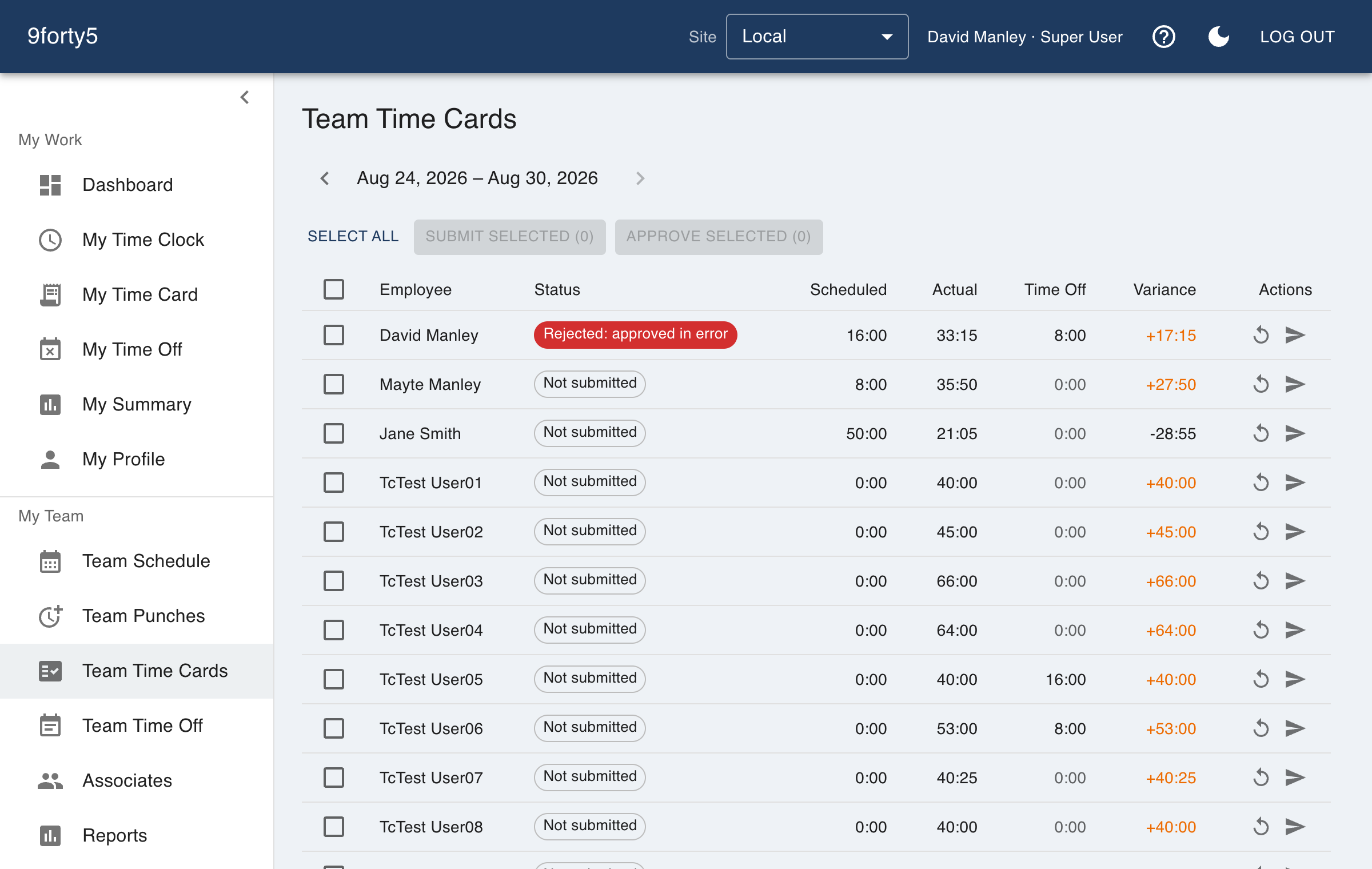
Every punch lands on a time card that computes regular, overtime and double time as the day is worked, under the preset for the state the site is in. Managers correct, approve and lock the period.
- Weekly, daily, double-time and 7th-day rules per site
- Approved periods lock so payroll never shifts
- PTO and paid holidays as their own lines
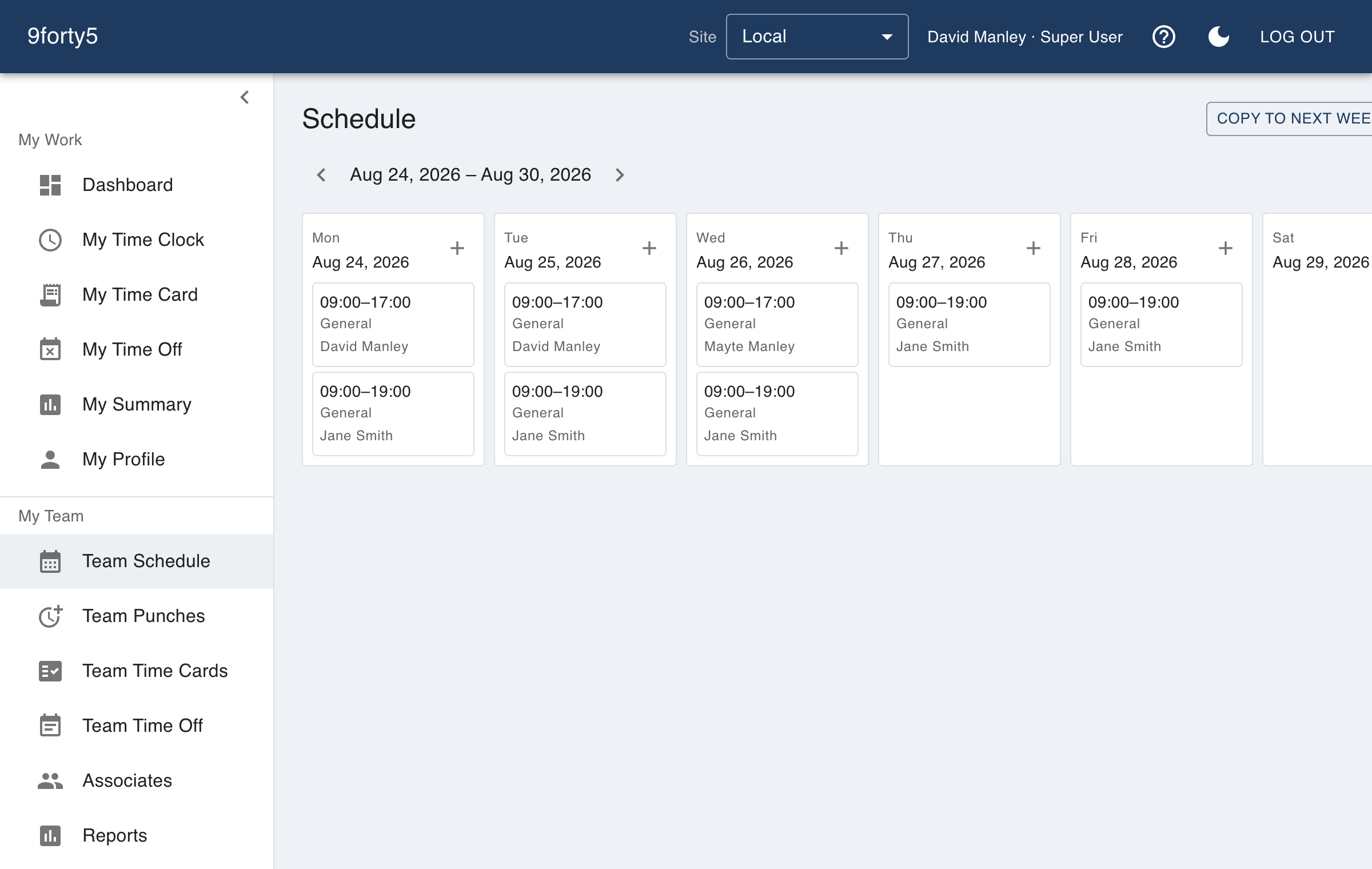
Scheduling
Build the week once, copy it forward, plan the meal break in
Shifts carry their unpaid break so scheduled hours mean paid hours, and the variance report shows where the week drifted from the plan. Employees see their schedule in the app.
- Week and month views by employee or department
- Coverage by hour and unassigned shifts
- Scheduled versus actual by department
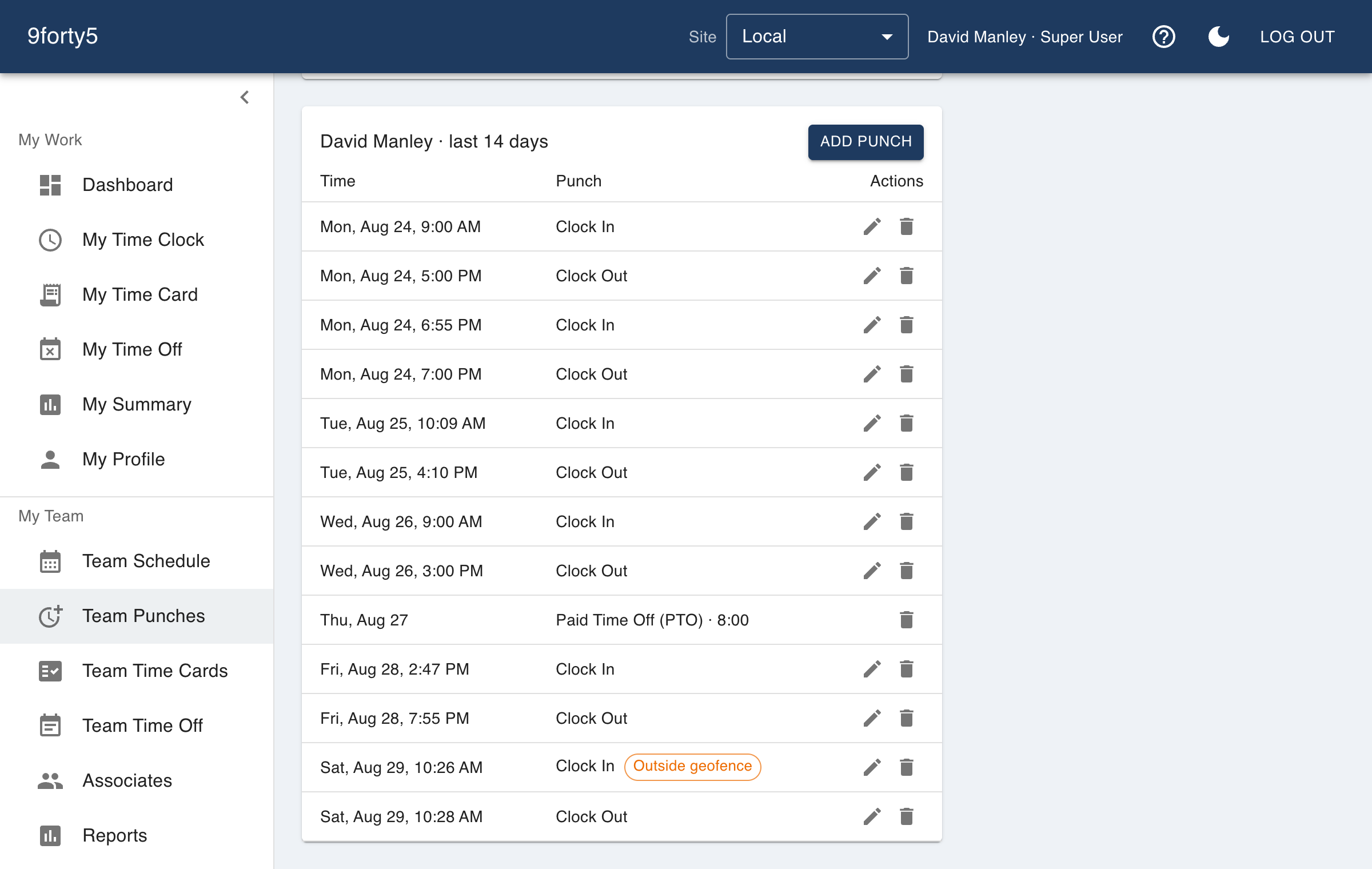
Location-based clock-in
Know where every punch happened
Draw a geofence around each site and choose whether an outside punch is recorded, flagged or refused. Location is captured only at the moment of the punch, never in between.
- Per-site geofence on a map
- Flag or require on-site punches
- Works in the iPhone and Android app and the browser
Every state
Built for the rules where you are, not just where we are
Overtime thresholds, break requirements and paydays differ by state, and a business with two locations may have to follow two sets. Overtime presets are a site setting, and our state guide explains the rules in plain English.
- Daily overtime presets for California, Alaska, Colorado and Oregon manufacturing
- California double time and seventh-consecutive-day rule, no pyramiding
- Meal and rest breaks recorded as punches, paid or unpaid
- Pay periods weekly, biweekly, semimonthly or monthly per site
51 state pages, reviewed and updated.
Industries
Made for businesses that run on the clock
A kitchen, a job site and a client's living room all need the same honest record of who worked when. See how each industry uses it.
Restaurants
Kitchen and front of house on one clock, meal breaks that are actually punched, split shifts that band correctly, and a schedule the crew sees on their phone..
Retail
One account for every store, coverage by hour so the floor is never empty, and an overtime watchlist that shows who to send home before the premium starts..
Construction & field crews
Crews clock in from the truck with the job site recorded, the foreman sees who is on site now, and hours split by crew and job for the office..
Home health & care
Aides clock in at the client's door from their own phone, the agency sees the visit happened where it should have, and the week's hours go to payroll without a paper visit log..
Manufacturing
Shifts by line and department, meal breaks that are punched, overtime rules that follow the plant's state, and a supervisor approval that locks the period for payroll..
Cleaning & facility services
Crews punch at each customer building from their phone, the office sees the building was actually visited, and hours by site tell you which contracts are profitable..
Logistics & delivery
Drivers clock in from the yard, warehouse staff from the dock, and the dispatcher sees who is on the clock right now.
Salons & spas
A front-desk tablet or a phone as the clock, a schedule the team can see, and time-off requests that do not live in a group chat..
Landscaping & lawn care
Crews clock in from the yard or the first property, the office sees where each punch happened, and hours by crew and by site show which accounts are running over what you bid..
Child care & daycare
Teachers and aides clock in at the center, the director sees who is on the floor right now, and the schedule shows coverage hour by hour so the ratio is never a surprise at pickup time..
Security guard companies
Guards punch in at the post from their own phones, the office sees that they were actually on site, and overnight and 12-hour shifts are banded by the overtime rules of the state each post is in..
Auto repair shops
A shop-floor computer or each tech's phone as the clock, hours that match the paycheck, and a service desk and a shop floor reported separately..
Medical & dental offices
Front desk, assistants and hygienists clock in; the dentist or physician who owns the practice does not need to.
Staffing agencies
Temporary workers punch at the client's location from their own phones, the agency sees where each shift happened, and all of a worker's assignments in a week land on one time card..
Nonprofits
Hours by program, time off that matches the staff handbook, and a flat price a budget can plan around.
Property management
Maintenance techs punch at the building they are working in, leasing staff clock in at the office, and the owner sees hours by property..
Mobile app
The whole day on the phone that is already in their pocket
Clock in, see the time card, check the schedule and request a day off from the iPhone or Android app. Face ID or fingerprint sign-in, GPS punch location when the site asks for it, and nothing to type.
On a phone? Open 9forty5.com/app and it takes you to the right store.
Payroll
Approved hours go straight into payroll
Import-ready files for the payroll systems small businesses actually use, with overtime, double time and paid time off in their own columns.
Plus a generic CSV for everything else. Provider names are trademarks of their owners.
Pricing
Flat monthly pricing by team size
Free for up to 3 employees, then one flat price for your whole team. Every compliance feature on every paid plan; the only add-on is AI insights.
Free
$0
forever1-5 employees
$24
flat / month6-15 employees
$49
flat / month16-25 employees
$99
flat / monthFAQ
Questions people ask before they sign up
Yes. Teams of up to 3 employees at one site use 9forty5 free for good, with no credit card and no trial clock. Paid plans are a flat monthly fee by team size.
Yes. Weekly overtime after 40 hours is on by default, and daily overtime, double time and seventh-day rules are available as presets for California, Alaska, Colorado and Oregon manufacturing, set per site.
Gusto, QuickBooks Payroll, ADP RUN, Paychex, Rippling and OnPay, each in the provider's own import layout, plus a generic CSV for anything else.
Yes. The iPhone app lets employees clock in and out, see their time card and schedule, and request time off, with passkey sign-in and GPS punch location. Android is in testing.
Yes. Each location is a site with its own schedule, pay period, overtime preset, break rules and geofence, and managers see their own sites while general managers see the company.
Yes. It is built for businesses anywhere in the United States, with overtime and break rules set per site so each location follows the law of the state it is in.
Most teams take their first punch within ten minutes: create the account, add a site, add employees, and clock in.
Try it free for 14 days. Flat monthly pricing after that.
No credit card, no per-seat surprises, no contract. Set up a site, add your team and take the first punch in under ten minutes. Teams of up to 3 can stay on the free plan for good.