Feature
Time card software with manager approvals
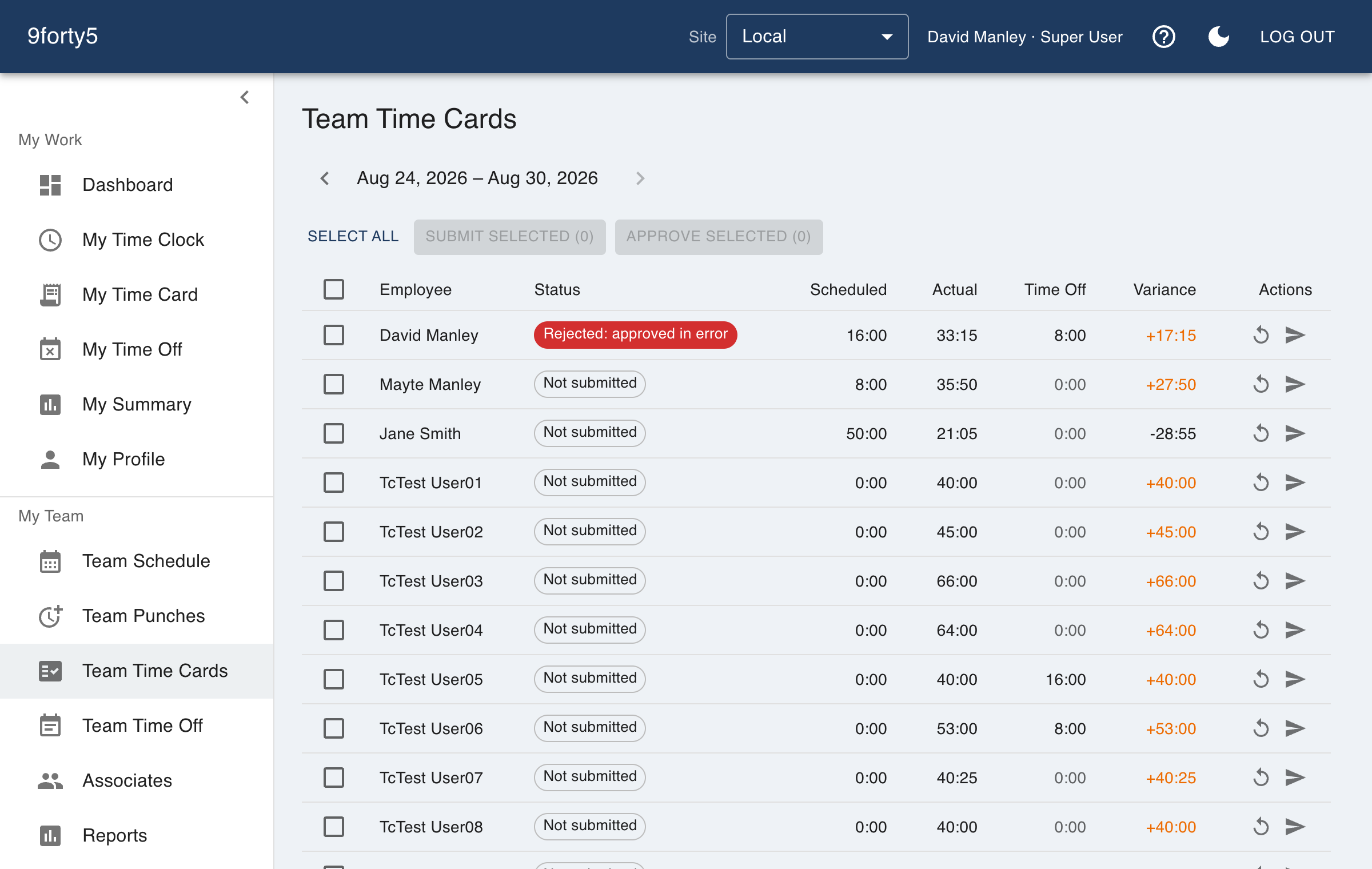
Every punch becomes a line on a time card that already knows your pay period, your overtime rules and your holidays. Managers fix what needs fixing, approve the period, and payroll gets a file that matches.
What you get
- Regular, overtime and double-time hours computed as the day is worked
- Weekly, biweekly, semimonthly and monthly pay periods per site
- Edit a punch and the whole period recalculates
- Approve per employee or the whole period at once
- Approved periods lock, so payroll never shifts under you
- Paid time off and paid holidays appear as their own lines
Overtime that is banded as it happens, not patched afterwards
9forty5 walks each day punch pair by punch pair and assigns hours to regular, overtime and double time as the thresholds are crossed. That order matters in states with daily overtime: an unpaid meal break, a split shift or a shift that crosses midnight all land in the right band because the calculation follows the clock rather than adding up a total and guessing.
The weekly threshold, a daily threshold if your state has one, and the seventh-consecutive-day rule are all site settings, with presets for California, Alaska, Colorado and Oregon manufacturing.
Approvals that mean something
A manager reviews the period, corrects a missed punch or a wrong department, and approves. An approved period is locked: a later edit to a holiday or a pay rule does not quietly restate hours payroll already paid. If something genuinely must change, the approval is reopened on purpose and the change is logged.
Built for more than one site
Pay periods are a site setting, so a company with a weekly-paid crew in one location and a biweekly office in another runs both from one account. Managers see their own sites; general managers see the company.
Frequently asked
Yes. Employees see their current and past time cards in the web app and the iPhone app, including which hours were regular, overtime, break, holiday or time off.
Weekly, biweekly, semimonthly and monthly, with the start day you choose. The schedule is set per site and can be re-cut going forward.
Approving a period locks it. Holidays, pay rules and punch edits that would touch a locked period are refused until a manager reopens it deliberately.
Goes with
Time clock
A web and mobile time clock employees use to punch in and out from any device. Accurate timestamps, punch rounding, meal breaks and location capture. Free for up to 3 employees.
Overtime tracking
Track overtime under federal and state rules: weekly after 40, California daily and double time, Alaska, Colorado, Oregon manufacturing and 7th-day premiums. Presets included.
Payroll export
Export an approved pay period as an import-ready file for Gusto, QuickBooks Payroll, ADP RUN, Paychex, Rippling, OnPay or a generic CSV, with regular, overtime, double time and PTO split out.
Try it free for 14 days. Flat monthly pricing after that.
No credit card, no per-seat surprises, no contract. Set up a site, add your team and take the first punch in under ten minutes. Teams of up to 3 can stay on the free plan for good.