Online timesheet software
Online timesheet software that builds the timesheet for you
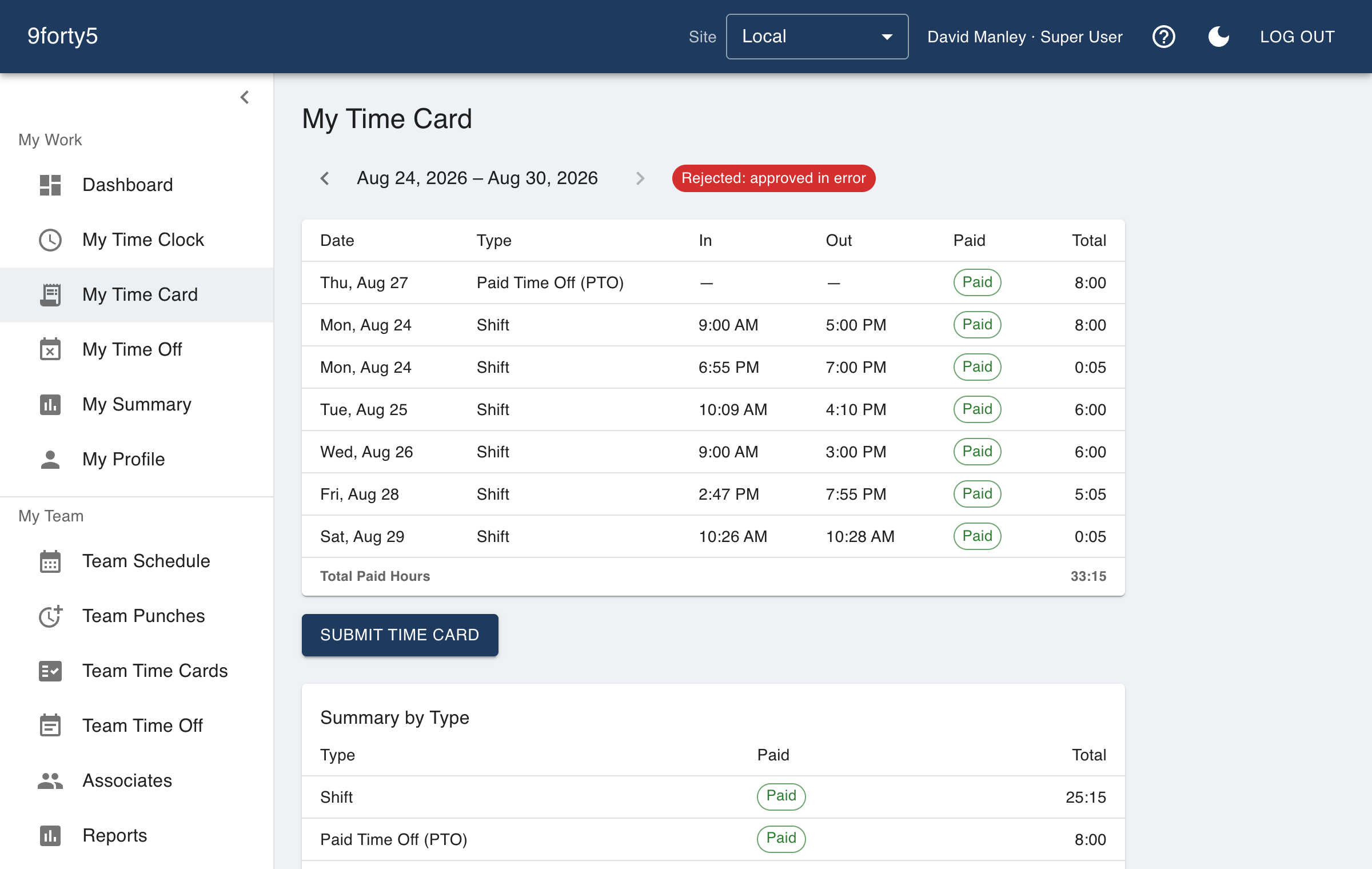
In 9forty5 nobody fills in a timesheet. Employees punch, and the timesheet writes itself: daily hours, breaks, overtime and time off, ready for a manager to approve.
What you get
- The timesheet is built from punches, so there is nothing to type
- Regular, overtime, double time, break and time-off hours by day
- Weekly, biweekly, semimonthly and monthly pay periods
- Employees review their own timesheet in the app
- Managers approve by employee or the whole period at once
- An approved period locks and exports to payroll
Why not let employees type their hours?
Hand-filled timesheets are filled in on Friday, from memory, and rounded in a direction that is rarely accidental. Punches taken at the time are more accurate, cheaper to review and harder to dispute. If a punch is missed, a manager adds it, and the change is logged.
Employees still see everything: their timesheet for the current and past periods, with which hours were regular, overtime, break, holiday or time off.
Approval that means something
A manager reviews the period, corrects what needs correcting and approves. An approved period is locked, so later edits cannot silently change what payroll was told. The approvals report shows who has not yet signed off, so the period closes on time.
A card cannot be submitted or approved while a shift is still in progress, so an overnight shift is never approved half-finished.
Straight to payroll
Approved timesheets export in the layout your payroll provider imports, with overtime and double time in their own columns. For W-2 reporting in 2026, the federal overtime hours that qualify are carried as a separate memo figure in the formats that can hold one.
Good to know before you start
What it does not do matters as much as what it does.
- Hours come from punches and manager entries. Employees do not type in their own weekly hours.
- Timesheets here are by site and department, not by project or client.
- There is no e-signature on the timesheet; approval is recorded by the manager's account.
Free for up to 3 employees, then a flat monthly price by team size from $24. See pricing
Frequently asked
You do not need one. The time card is the timesheet and it calculates itself. If you want a spreadsheet, the payroll export gives you a CSV of the approved hours.
Overtime is calculated per workweek and, where the state requires it, per day, using the rules set for the site. Meal breaks are punched, so unpaid time is taken out of the right hours.
Yes. Employees see their timesheet in the app and can raise a correction with their manager, who fixes the punch with a recorded edit.
Approving a pay period locks it. A change to a locked period is refused until a manager reopens it on purpose.
The features behind it
Time cards & approvals
Digital time cards that calculate regular, overtime and double-time hours as punches happen. Review, edit and approve by employee, team or pay period, then export to payroll.
Payroll export
Export an approved pay period as an import-ready file for Gusto, QuickBooks Payroll, ADP RUN, Paychex, Rippling, OnPay or a generic CSV, with regular, overtime, double time and PTO split out.
Overtime tracking
Track overtime under federal and state rules: weekly after 40, California daily and double time, Alaska, Colorado, Oregon manufacturing and 7th-day premiums. Presets included.
Reports & insights
Hours by employee and department, overtime watchlist, scheduled versus actual variance, site comparison, and pay-period summaries. Built in, no report builder needed.
How different businesses use it
Manufacturing
Shifts by line and department, meal breaks that are punched, overtime rules that follow the plant's state, and a supervisor approval that locks the period for payroll.
Restaurants
Kitchen and front of house on one clock, meal breaks that are actually punched, split shifts that band correctly, and a schedule the crew sees on their phone.
Staffing agencies
Temporary workers punch at the client's location from their own phones, the agency sees where each shift happened, and all of a worker's assignments in a week land on one time card.
Nonprofits
Hours by program, time off that matches the staff handbook, and a flat price a budget can plan around. Volunteers are not employees, so they do not count and do not need an account.
Employee time tracking software · Free time clock · Time and attendance software
Try it free for 14 days. Flat monthly pricing after that.
No credit card, no per-seat surprises, no contract. Set up a site, add your team and take the first punch in under ten minutes. Teams of up to 3 can stay on the free plan for good.